
GAIN SLOTZ
Store And Switch Between Nine Gain Levels
Switch between multiple gain levels in a single plugin using a non-destructive workflow. Safely preview new levels without having to worry about losing volume choices you previously worked to dial in.
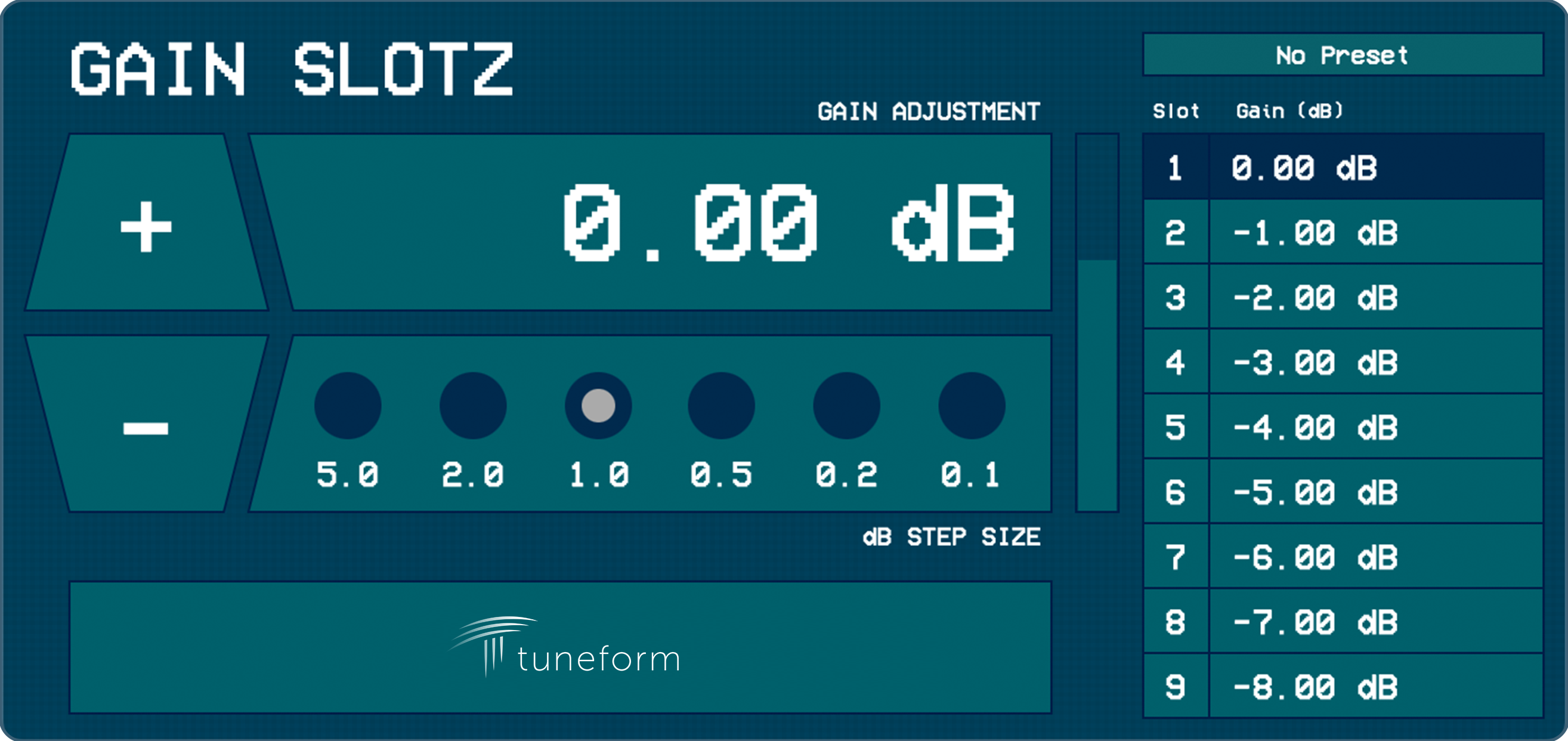
Gain Slotz is a focused mixing utility for storing nine gain values inside one audio effect plugin. Put it on a track, bus, aux, or master channel, set the slots you want to audition, and switch between them without rebuilding your mix decisions from memory.
Available Formats: VST3, AU, AAX, and CLAP
Fast Mix Comparison
Quickly make & compare level decisions without relying on memory, undo history, or project-file rollbacks.
- Store nine different level adjustments at once.
- Each slot allows gain adjustments from -90.00 dB to +45.00 dB.
- Change the active slot by pressing the corresponding slot number on your keyboard.
Keyboard-Driven Precise Adjustment Controls
Dial in your gain adjustments through the UI, or use your keyboard for fast adjustments.
- Press the up/down arrow keys to adjust the active gain slot by the selected dB step size.
- The left/right arrow keys adjust the step size, ranging from 5 dB down to 1 dB.
- Hold Shift to make the same adjustments to every slot at once.
System Requirements
Gain Slotz can be used on 64 bit machines running either MacOS or Windows operating systems. Plugin use requires a compatible DAW or host.
MacOS System Requirements
- MacOS Version 10.13 or Newer
- Intel or Apple Silicon Mac (M1, M2, M3, M4)
- You must have a DAW/Host that supports one or more of the following formats:
- AU
- VST3
- CLAP
- AAX
Windows System Requirements
- Windows 10, Windows 11
- x64 Architectures Only (no Windows on ARM support)
- You must have a DAW/Host that supports one or more of the following formats:
- VST3
- CLAP
- AAX
License Activation
Purchasing a license allows authorized use of Gain Slotz on up to two (2) computers at the same time.
Activating the license requires an internet connection. There is no offline activation option.
GAIN SLOTZ
A mixing utility plugin for saving, comparing, and switching between multiple gain decisions in one place.
$17
GAIN SLOTZ FAQ
A regular gain plugin usually gives you one current value. Gain Slotz lets you save multiple values, compare them quickly, and return to earlier level decisions instantly.
Gain Slotz is available as VST3, AU, AAX, and CLAP. Platform availability depends on your operating system and host support.
Yes. Hosts that support plugin automation can automate the Active Slot parameter and each individual gain slot parameter.
Yes. Gain Slotz includes factory presets that automatically set each gain slot to a different value to make auditioning different levels quicker. You can also save and load your own preset files that best suit your workflow.
Yes. Your Tuneform account is where you access installers, license keys, activation management, and updates. If you do not have an account before purchase, you will be prompted to create one.
After purchase, you will be directed to the My Plugins section of your account to download the installer for your operating system. Run the installer and choose the plugin formats you want to install.
Close and reopen your DAW, or rescan plugins using your DAW's plugin manager. Also confirm that your DAW is scanning the correct VST3, AU, AAX, or CLAP folders for your system.
You can use Gain Slotz on up to two machines simultaneously per license. If two machines are already licensed and you activate it on a new machine, the least recently activated machine may be deactivated automatically.
There is a dedicated form in the My Plugins page where you can contact Tuneform about the plugin. You can also use the support portal at https://tuneform.com/support. The Gain Slotz Plugin Manual can be found at https://support.tuneform.com/gain-slotz-plugin-user-manual/.
Certain DAWs require you to configure an option to ensure plugins respond to keyboard input. Check your DAW's manual or support articles for guidance on how to enable this option.