

BPM TO MS
Tempo To Milliseconds Plugin And Standalone App
Convert BPM values into exact note durations, copy timing values, and export tempo-locked WAV or MIDI notes during music production, sound design, and mixing/mastering sessions.

BPM TO MS is a focused production utility for turning tempo into practical timing values. Use it inside your DAW as a plugin, or open the standalone app when you just need a quick calculator outside a session.
Available Formats: VST3, AU, AAX, CLAP, and Standalone App
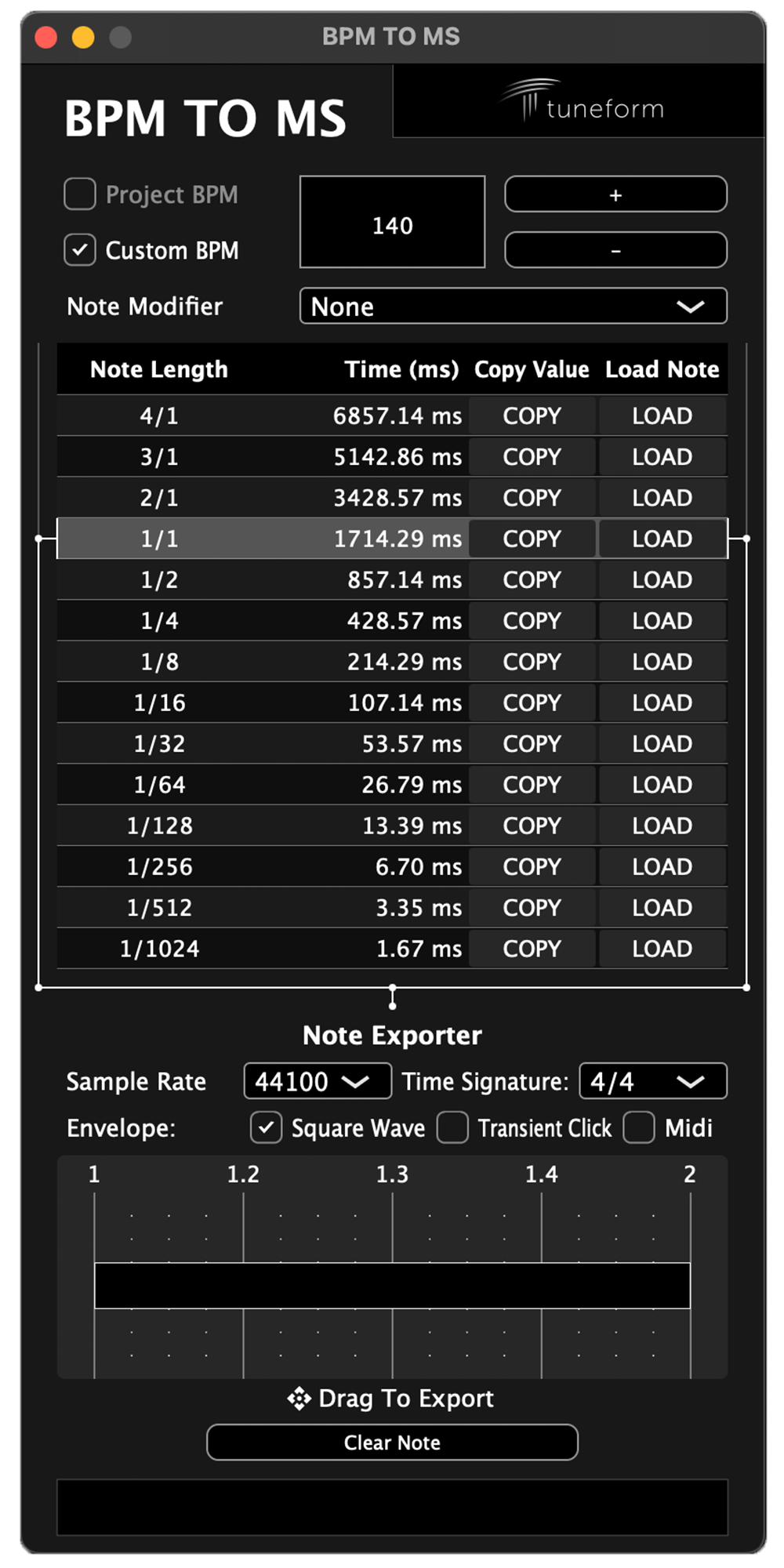
Tempo-Synced Time Conversion
Automatically sync with your DAW session's BPM, or enter a custom tempo manually.
- Convert musical note lengths from 4/1 down to 1/1024 into milliseconds.
- Switch between straight, dotted, double dotted, and triplet timing.
Copy Exact Millisecond Values
Effortlessly maintain rhythmic cohesion by copying exact duration values directly into audio effects and other plugins.
- Copy individual note durations straight to the system clipboard.
- Paste precise millisecond values into delays, reverbs, compressors, and other time-based effects parameters.
- Keep effects and plugin timing locked to the musical feel of your session.
Note Exporter
Load a note length and export tempo-matched helper files by dragging them into your session.
- Export square wave or transient click WAV files at common sample rates from 44.1 kHz through 192 kHz.
- Export MIDI notes with embedded tempo and time-signature metadata.
- When running in a DAW, exported output automatically syncs to the session sample rate and time signature.
Both A DAW Plugin And Standalone App
- Run BPM TO MS as a DAW plugin to automatically sync with your project settings.
- Use the standalone app to not have to worry about adding the plugin to every new session.
Lightweight
BPM TO MS is built to stay out of the way.
- When used as a plugin, it has no effect on audio.
- License activation is handled in the app/plugin without dongles or extra hardware.
System Requirements
BPM TO MS can be used on 64 bit machines running either MacOS or Windows operating systems. The standalone app can be used without a DAW. Plugin use requires a compatible DAW or host.
MacOS System Requirements
- MacOS Version 10.13 or Newer
- Intel or Apple Silicon Mac (M1, M2, M3, M4)
- To use as a plugin, you must have a DAW/Host that supports one or more of the following formats:
- AU
- VST3
- CLAP
- AAX
Windows System Requirements
- Windows 10, Windows 11
- x64 Architectures Only (no Windows on ARM support)
- To use as a plugin, you must have a DAW/Host that supports one or more of the following formats:
- VST3
- CLAP
- AAX
License Activation
Purchasing a license allows authorized use of BPM TO MS on up to two (2) computers at the same time.
Activating the license requires an internet connection. There is no offline activation option.
BPM TO MS
Tempo to milliseconds plugin and standalone app for producers, sound engineers, and audio professionals.
$17
BPM TO MS FAQ
BPM TO MS converts tempo and note lengths into exact millisecond values. It also lets you copy values and export tempo-matched helper notes as WAV or MIDI files.
Yes. BPM TO MS includes a standalone app, so you can use custom BPM calculations without opening a DAW or plugin host.
BPM TO MS is available as VST3, AU, AAX, CLAP, and a standalone app. Platform availability depends on your operating system and host support.
No. BPM TO MS is a utility plugin. When loaded in a DAW, audio passes through unprocessed. In standalone mode, input is muted to prevent feedback.
The Note Exporter can create square wave WAV files, transient click WAV files, and MIDI notes using the selected BPM, note length, modifier, sample rate, and time signature.
Yes. Your Tuneform account is where you access installers, license keys, activation management, and updates. If you do not have an account before purchase, you will be prompted to create one.
After purchase, you will be directed to the My Plugins section of your account to download the installer for your operating system. Run the installer and choose the plugin formats or standalone app you want to install.
Close and reopen your DAW, or rescan plugins using your DAW's plugin manager. Also confirm that your DAW is scanning the correct VST3, AU, AAX, or CLAP folders for your system.
You can use BPM TO MS on up to two machines simultaneously per license. If two machines are already licensed and you activate it on a new machine, the least recently activated machine may be deactivated automatically.
There is a dedicated form in the My Plugins page where you can contact Tuneform about the plugin. You can also use the support portal at https://tuneform.com/support.
Yes. The Plugin Manual can be found here: https://support.tuneform.com/bpm-to-ms-plugin-standalone-manual.